
A clip does well on TikTok. You download it, push the same file to Reels and Shorts, and it lands flat. Most creators blame the algorithm. Usually the reason is simpler and entirely fixable: the file you re-uploaded was built for one app, and it is still carrying that app’s furniture.
Burned-in captions sit in the wrong corner. The hook is timed for a feed that scrolls differently. The script was never written down anywhere, so the rewrite becomes guesswork. Repurposing does work — but only when the old layer comes off first.
I. Why One Upload Rarely Survives Three Platforms
Captions are baked into the pixels
Once captions are burned in, they are part of the image. No editor can switch them off, because there is no caption track to disable — only pixels that happen to look like text. Every crop, resize, and reframe drags them along.
Every app puts its interface somewhere else
TikTok stacks the username, caption, and action buttons in one corner. Reels and Shorts claim different edges of the same vertical frame. Text that sat comfortably in a safe zone on one platform ends up buried under a like button on the next.
That leaves three separate problems in one file:
- Occlusion — native interface elements covering your text
- Duplication — your burned-in line fighting the platform’s own auto-captions
- Drift — text placed for a 9:16 crop sliding out of position after a reframe
The same words read at different speeds
A line that felt punchy at TikTok pacing can feel sluggish on Shorts. Reading speed, caption length, and line breaks all shift with the audience. Reusing the exact text layer freezes decisions you should be making again for each destination.
II. The Caption Layer Is the First Thing to Fix
Cropping is not removal
The usual workaround is to crop the captions out or cover them with a sticker. Both cost you frame. On a vertical video where every pixel is already scarce, trading composition for a patch is a bad deal — and viewers notice the seam.
What automatic caption removal actually does
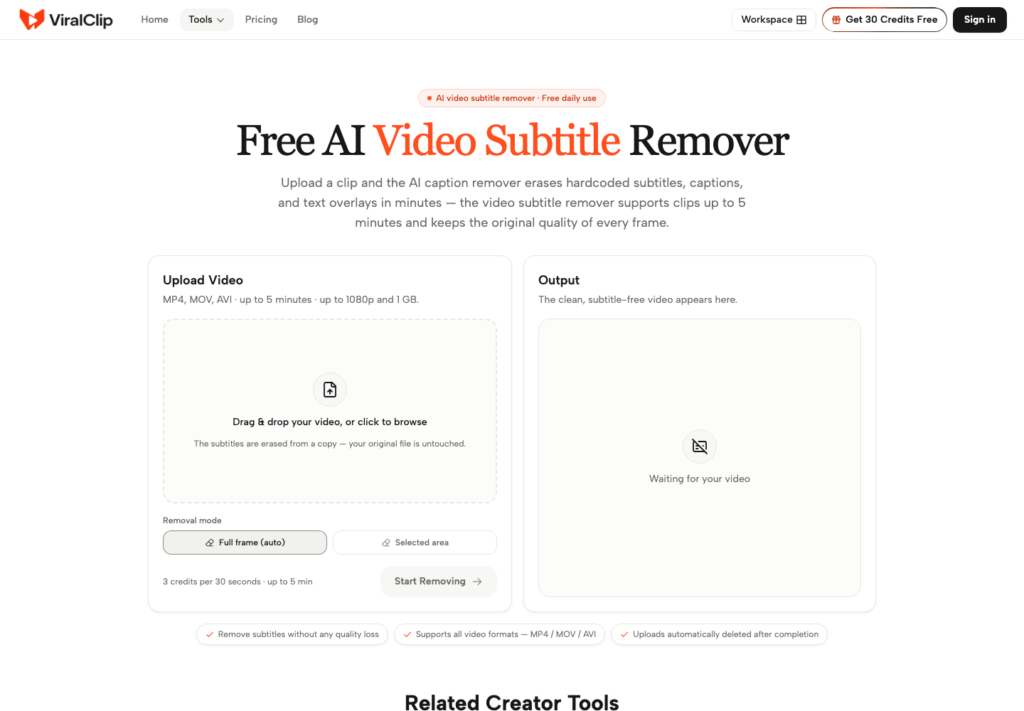
A tool built to remove captions from video works differently. It detects burned-in subtitles, hardcoded text, and overlay watermarks, erases them frame by frame, and rebuilds the background behind them. On ViralClip the scan covers the whole frame automatically, so there is no manual masking to draw.
Know the limits before you queue a file
Practical numbers matter more than promises. The remover accepts MP4, MOV, and AVI, handles clips up to five minutes, and typically clears a thirty-second clip in about two minutes. Uploads are deleted automatically once processing finishes.
Worth checking before you queue a batch:
- Length — anything past the five-minute ceiling needs splitting first
- Container — confirm the export is MP4, MOV, or AVI before uploading
- Density — frames where text sits over fine detail are the hardest to rebuild, so check those first
- Retention — pull your finished file promptly, since uploads do not linger on the server
III. What a Clean Master File Actually Buys You
One source, many destinations
With the text layer gone you are holding a neutral master. That single file can be re-captioned for TikTok, Reels, Shorts, and a paid placement without anyone opening the original project or hunting for the source footage again.
Localisation stops being a re-shoot
Stripping the original language layer is what makes translation practical. The visuals stay intact and only the text changes, so a clip made for one market becomes the base for several. Nothing has to be filmed twice.
Ad variants get cheap
Performance teams need many versions of one idea. A clean master lets you swap the on-screen claim, the offer, and the call to action without touching the footage — which is exactly where most of the production cost sits.
IV. Read the Script Before You Rewrite It
Timestamps show where attention breaks
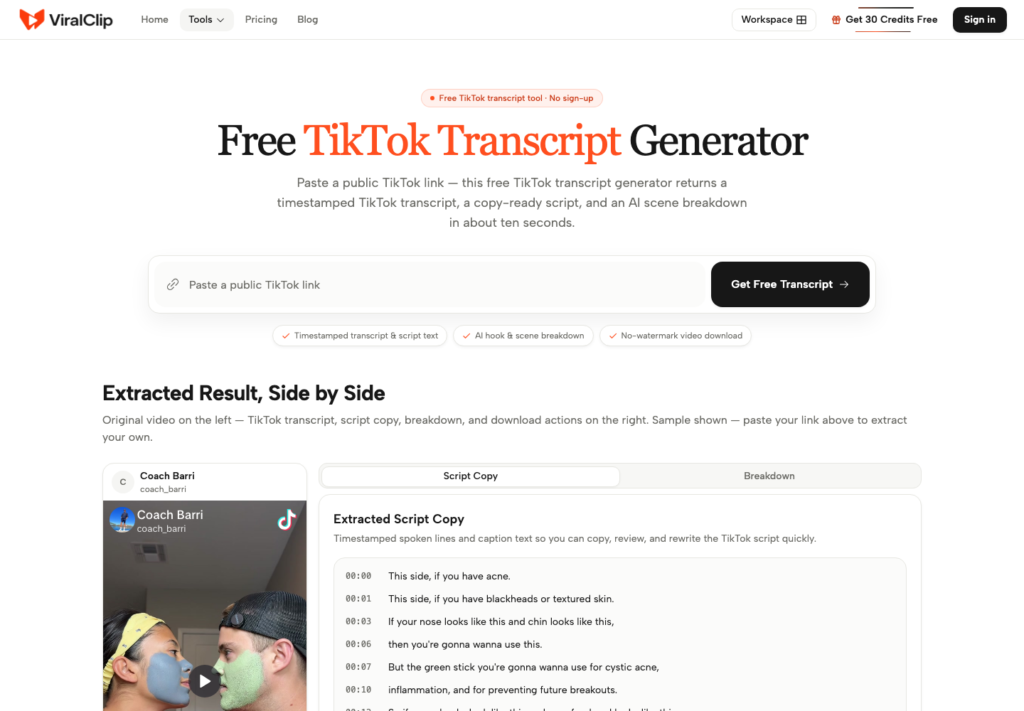
Pulling a tiktok transcript with timestamps makes the structure visible. Every spoken line arrives with its exact second, so you can measure how long the hook ran, when the demo started, and where the call to action actually landed.
Turn speech into a working script
Watching a video back is a slow way to study it. A copy-ready script version pastes straight into a brief, a rewrite, or a prompt. From a public link the whole thing takes roughly ten seconds, and no account is required to try it.
Structure beats vocabulary
A transcript can be broken into Hook, Demo, Product Intro, Usage Detail, and CTA blocks, each with a short note on why that section works. Copying someone’s words rarely helps. Copying the shape of their argument usually does.
V. Rebuild the Cut for Each Destination
Re-caption per platform, not once
Write the caption layer separately for each app. Keep lines short enough to read at that platform’s pace, and place them where that platform’s interface is not already sitting. This is a two-minute job on a clean master and impossible on a dirty one.
Move the hook, not just the text
If the transcript shows the hook running four seconds, test a two-second version for the feed that punishes slow starts. Repurposing is not only cosmetic — the timing of the first beat is usually what decides whether the rest gets watched.
Check the frame on a real phone
Desktop previews lie. Safe zones, thumb position, and caption contrast all look different on a handset in daylight. One pass on an actual phone catches more problems than an hour of squinting at a timeline.
VI. A Weekly Repurposing Routine That Holds Up
Audit at the start of the week
Pick the three clips that performed best in the last fortnight and the two that underperformed but had a good idea inside them. Five files is enough. A backlog larger than that stops being a routine and becomes a project nobody starts.
Clean and re-cut midweek
Run the batch through caption removal, then transcribe each one and mark where the structure breaks. Working in a batch matters — the decisions get faster when you see five hooks side by side instead of one at a time.
Publish and log at the end
Ship the variants and write down what changed. A one-line note per clip is enough:
- Source — which original the variant came from
- Change — new hook, new caption layer, new CTA, or all three
- Destination — the platform it was rebuilt for
- Result — the number you will compare against next week
Without that log you will repeat the same experiment in a month and call it a new idea.
VII. Where This Workflow Stops Helping
Long-form needs a different plan
This routine is built for short vertical video. A forty-minute podcast or a webinar recording needs chaptering and highlight selection first — different problem, different tools. Do not stretch a short-form workflow over footage it was never shaped for.
Some clips should simply be retired
Not every underperformer is a repurposing candidate. If the idea was weak, cleaning the captions off it just produces a tidier version of the same weak idea. Cutting the file loose is often the higher-value decision.
Automation is not strategy
Removing text and reading transcripts are mechanical steps. They buy back hours, which is genuinely useful, but they do not decide what to say. The judgement about which idea deserves a second run stays with you.
Conclusion
Most failed reposts are not algorithm problems. They are layering problems: an old caption track sitting on top of a new audience, and a script nobody ever wrote down.
Fixing that is a short list. Strip the burned-in text so the file becomes a neutral master. Read the transcript so you know what the structure was doing before you change it. Rebuild the captions and the hook for the platform you are actually publishing to. Then log what you changed.
None of these steps is glamorous, and none of them requires new footage. That is the point — the cheapest video you will publish this month is one you have already shot.