
If your product photos are just sitting in a folder, you’re leaving conversions on the table.
Video is the format that drives purchases, builds brand awareness, and wins the algorithm on every major platform right now. TikTok, Instagram Reels, YouTube Shorts — they all reward motion. And yet most brands still treat their best visual assets as static content.
That gap is your opportunity.
AI image-to-video technology lets you take any photo and transform it into a professional marketing video in minutes. No filming. No editing software. No production agency. This guide covers exactly how to turn images into marketing videos — and why this workflow is quickly becoming the new standard for smart marketing teams.
Why Static Images Aren’t Enough Anymore
Video consistently outperforms images in engagement, click-through rates, and conversion across every major digital channel. Facebook and Instagram’s algorithm gives video content significantly more organic reach. TikTok is built entirely around video. YouTube Shorts delivers discovery at scale. Even Google now surfaces video results prominently for commercial queries.
The challenge has always been producing enough video, fast enough, at an acceptable cost. That’s what AI solves.
What Does Image-to-Video AI Actually Do?
AI image-to-video tools analyze a static photograph and generate realistic motion around it. The AI interprets the subject, composition, and visual context of your image and produces:
- Camera motion (push-ins, pans, aerial pull-backs)
- Subject animation (products rotating, elements shifting)
- Cinematic lighting adjustments and depth effects
- Atmospheric transitions and visual storytelling flow
You provide the visual foundation. The AI handles the motion and production. The result is a video that looks intentionally filmed — without a single frame of actual footage.
How to Turn an Image into a Marketing Video (Step-by-Step)
Here’s the beginner-friendly workflow.
Step 1: Open the Image to Video Generator and Upload Your Image
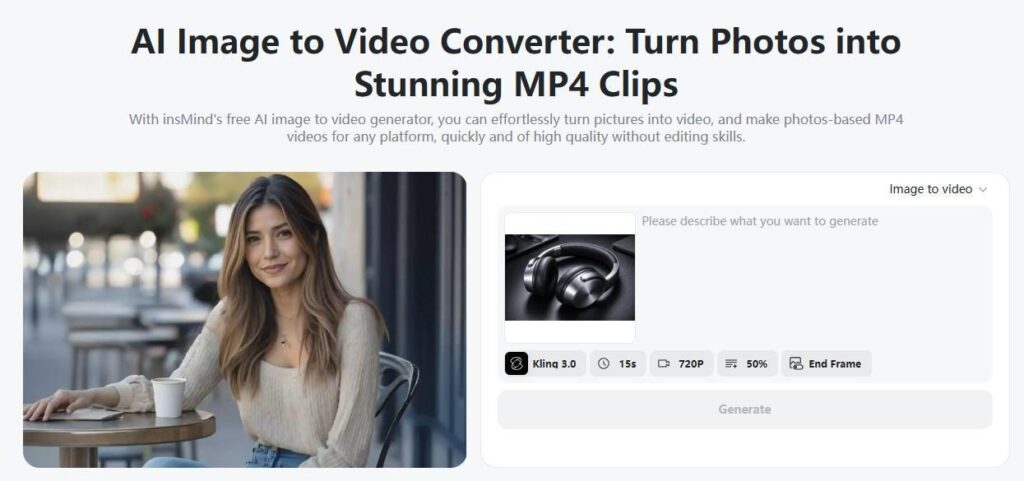
Go to the insMind image to video generator tool. This feature converts any image into an animated marketing video using AI motion technology.
You can upload:
- Product photos
- Brand visuals
- AI-generated images
- Lifestyle photography
- Character or influencer images
Tip: High-resolution images produce the best results.
Step 2: Enter a Marketing Prompt
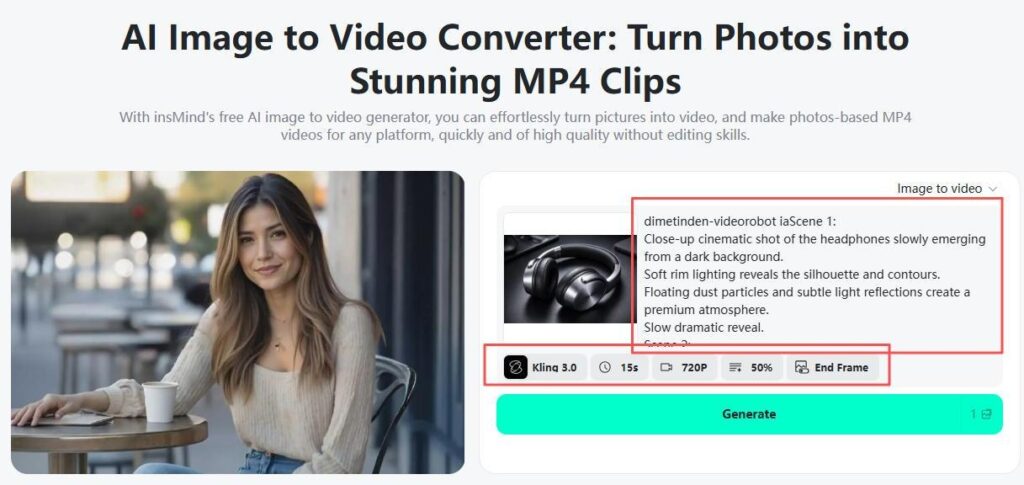
Now describe how you want your video to feel.
Your prompt controls storytelling direction — almost like directing a commercial.
Step 3: Adjust Video Settings
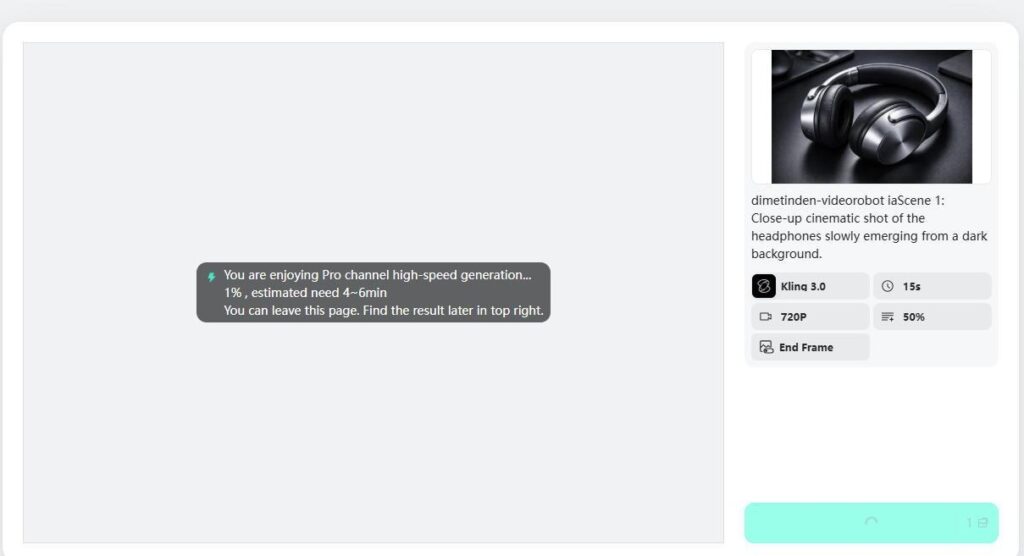
Customize your marketing video:
- Choose AI model (Google Veo 3.1, Kling 3.0, Wan, etc.)
- Select video duration
- Set aspect ratio (9:16 for TikTok, 16:9 for YouTube)
- Choose resolution
- Adjust motion intensity
This flexibility allows creators to tailor videos for different platforms.
Step 4: Generate and Download
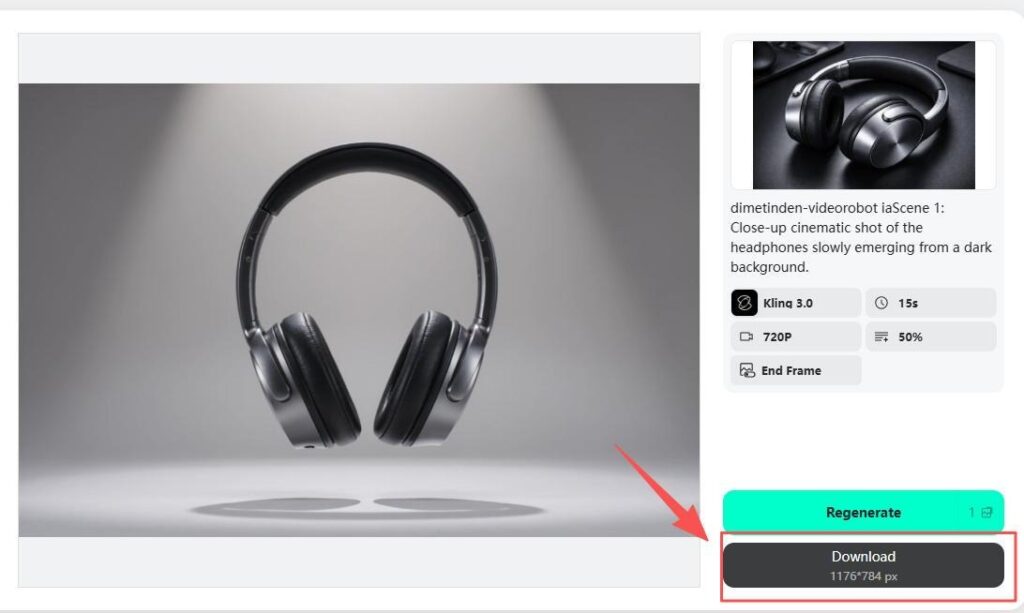
Click Generate.
Within moments, insMind creates a fully animated marketing video.
Preview instantly, then download your video ready for:
- Ads
- Reels
- Shorts
- Product pages
- Campaign launches
No editing required.
Best Marketing Video Formats You Can Create from a Single Image
Product Promotion Videos
Turn a clean product photo into a cinematic showcase with motion lighting and visual depth. These work directly as paid ad creative for Meta, TikTok, and Google campaigns.
Vertical Social Ads
Generate 9:16 native content ready for TikTok and Instagram instantly. The format fills the screen, the AI handles the motion, and the result looks platform-native — not repurposed.
Brand Story Clips
Animate images — lifestyle photography, aspirational visuals — into emotional narrative sequences that communicate what your brand represents beyond just the product.
Ecommerce Listing Videos
Product pages with video see dramatically higher conversion rates. AI makes it practical to produce individual showcase videos for large catalogs — without a shoot for each SKU.
Before & After Transformations
Perfect for beauty, fitness, home improvement, or any service where visual change is the core value proposition.
What Makes insMind Ideal for Marketing Video Creation?
Many tools animate images — but marketing requires control and consistency. insMind focuses specifically on creator and brand workflows.
Intelligent Motion Design
AI generates camera movements that feel intentional rather than random.
Marketing-Ready Formats
Export videos optimized for social platforms immediately.
Multiple Advanced Models
Choose different AI engines depending on style and realism needs.
Prompt-Driven Creativity
Direct the visual outcome without technical editing skills.
Fast Iteration
Create multiple ad versions quickly for A/B testing.
Real Marketing Use Cases
Ecommerce Sellers
Turn product catalog photos into engaging ad creatives. Result: Higher engagement without new photoshoots.
Small Businesses
Create promotional videos for launches or discounts using existing brand images.
Content Creators
Convert thumbnails or artwork into short-form video content.
Agencies
Produce client marketing assets faster and scale campaigns efficiently.
Tips for Better Marketing Videos from Images
Use Clear Subject Focus
Avoid cluttered images. AI performs best with a defined focal point.
Match Prompt to Brand Style
Luxury brands → slow cinematic motion. Youth brands → energetic movement.
Optimize Aspect Ratio First
Vertical videos perform best for social platforms.
Generate Multiple Variations
Small prompt changes can create entirely different marketing moods.
Frequently Asked Questions
Can I create marketing videos from images without editing experience?
Yes. AI handles animation, motion, and transitions automatically. You only upload an image and describe the result you want.
What images work best for marketing videos?
Product photos, lifestyle shots, brand visuals, and AI-generated images all work well, especially high-resolution images.
Are AI marketing videos suitable for ads?
Absolutely. Many creators use image-to-video AI specifically for paid ads because it allows fast creative testing.
Can I create videos for TikTok and Instagram?
Yes. Choose vertical (9:16) format during settings to generate social-ready videos.
How long does it take to generate a video?
Most videos are generated within minutes depending on settings and model choice.
Do I need multiple images?
No. One image is enough, though multiple versions can help create campaign variations.
Final Thoughts
Marketing success today depends on motion, storytelling, and speed. AI makes all three accessible to everyone — not just professional video editors.
Instead of letting great visuals sit unused as static images, transform them into marketing videos that capture attention and drive results.
Upload an image. Describe your vision. Let AI handle the rest.
Your next high-performing marketing video might already be sitting in your photo library.