
Some of my least productive content days do not start with a lack of ideas. They start with too many of them.
A tutorial I want to learn from. A creator interview with one strong insight buried inside it. A competitor video I should probably review. A long-form discussion that might help me shape a better angle. Before I even start scripting, I already have six YouTube tabs open and no clear path from “research” to “something I can actually make.”
That is the problem Video Transcriber AI helps me solve through its YouTube Video Summarizer.
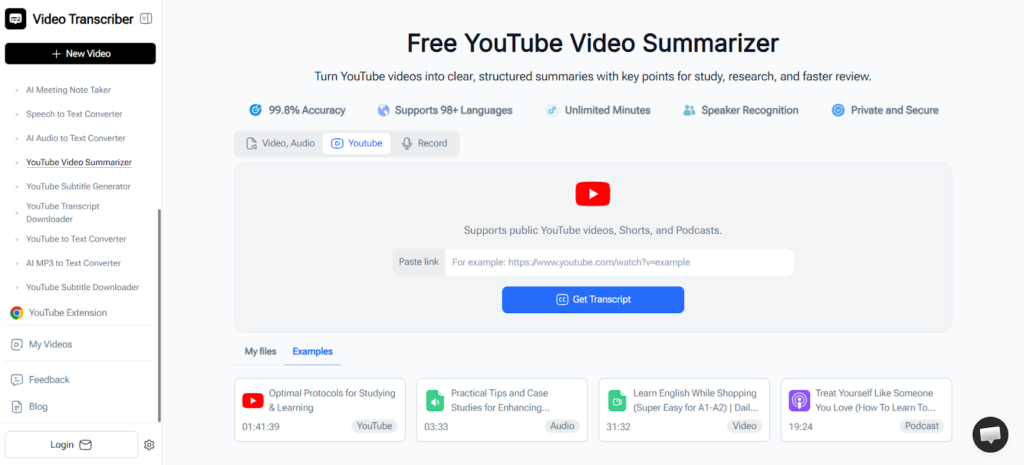
As a video creator, I do not just need more information. I need a faster way to turn useful videos into usable ideas. Video Transcriber AI makes that process much lighter. I can paste a YouTube link, get a structured summary, pull out the key points, and move forward without getting stuck in endless watching. Since Video Transcriber AI’s YouTube Video Summarizer works without sign-up, supports 100+ languages, and lets me explore the content more deeply with AI chat, it fits naturally into the messy middle of content creation, where ideas need structure before they become scripts.
Why this matters so much in a creator workflow
The hardest part of creating videos is not always filming or editing. For me, it is often the stage before that.
It is the moment when I know I want to make something useful, but I am still collecting references, checking angles, studying how others explain the topic, and trying not to repeat what is already out there. This stage matters because better research often leads to better content. But it can also become a trap.
I used to spend too much time watching reference videos from start to finish, even when I only needed a few takeaways from each one. By the time I was ready to write, I had consumed a lot of content but still did not have a clean outline in my head. That is where Video Transcriber AI’s YouTube Video Summarizer became genuinely practical for me. It helps me move from scattered input to clearer direction much faster.
(With just a video link, you can get a structured summary using Video Transcriber AI’s YouTube Video Summarizer)
Where Video Transcriber AI fits into my workflow
1. I use it to research topics faster
When I am planning a video, I usually start by looking at a few YouTube videos around the same subject. Sometimes I want to understand how other creators are framing the topic. Sometimes I am checking what questions people are answering well and what gaps are still open. Sometimes I just need a quick overview before deciding on my own angle.
Without a YouTube Video Summarizer (https://videotranscriber.ai/youtube-video-summarizer), this part gets bloated very quickly. I end up watching too much and retaining too little.
With Video Transcriber AI, I can summarize those reference videos first and focus on the parts that are actually useful. That helps me compare ideas faster and decide which sources deserve deeper attention.
2. I use it to turn reference videos into script material
This is where Video Transcriber AI’s YouTube Video Summarizer becomes more than a convenience tool.
Once I get a structured summary, I can move the best points into my script notes. I might pull one creator’s framing, another video’s example, and a third video’s missing angle, then start shaping my own version. I am not copying anyone. I am organizing what I learned in a way that helps me create something clearer and more original.
That is a big difference. Good research should support creativity, not smother it. Video Transcriber AI helps me extract the value from long videos without getting trapped inside their pacing.
3. I use it with other tools I already rely on
This is one reason the workflow feels natural.
After using Video Transcriber AI’s YouTube Video Summarizer, I usually move the strongest points into Notion, Google Docs, or my script outline. If I am refining the angle, I may use an AI writing tool to reorganize rough notes into a cleaner structure. If I am already in production mode, I may turn those points into voiceover lines, on-screen text, or short-form content ideas.
So in practice, the flow often looks like this:
YouTube reference video → Video Transcriber AI summary → notes or outline → script draft → editing and repurposing
That may sound simple, but it removes a lot of friction from the early stage of content creation.
What problems it actually solves for me
It stops research from taking over the whole day
This is the biggest one.
As a creator, I know research is important. But I also know it can quietly become procrastination with good branding. I tell myself I am learning, preparing, studying the space. Sometimes that is true. Sometimes I am just buried in long videos and delaying the actual work.
Video Transcriber AI’s YouTube Video Summarizer helps me keep research useful and contained. I can get the core points faster, decide what matters, and move on to writing.
It makes it easier to find my own angle
Watching too many full videos can actually make my thinking less clear. I start hearing everyone else’s pacing, examples, and structure in my head. That is not ideal when I am trying to make something in my own voice.
Using Video Transcriber AI, I can focus more on the ideas than the delivery. I see the essence of a video more quickly, which helps me step back and decide what I want to do differently.
It helps me repurpose ideas across formats
A good source video can support more than one output.
Once I have the summary, I can use it for:
- a full YouTube script
- a short-form video angle
- a carousel post
- a newsletter idea
- a content brief for later
That makes Video Transcriber AI’s YouTube Video Summarizer useful beyond one single task. It supports the kind of multi-format workflow many creators already have.
It makes multilingual inspiration more usable
Some of the most useful creator ideas are not in English. Sometimes a smart format, strong hook, or interesting explanation comes from creators in other languages. Since Video Transcriber AI supports 100+ languages, it becomes much easier to learn from a wider range of content and bring those insights into my own planning process.
That matters a lot when I want to expand my references beyond the usual sources.
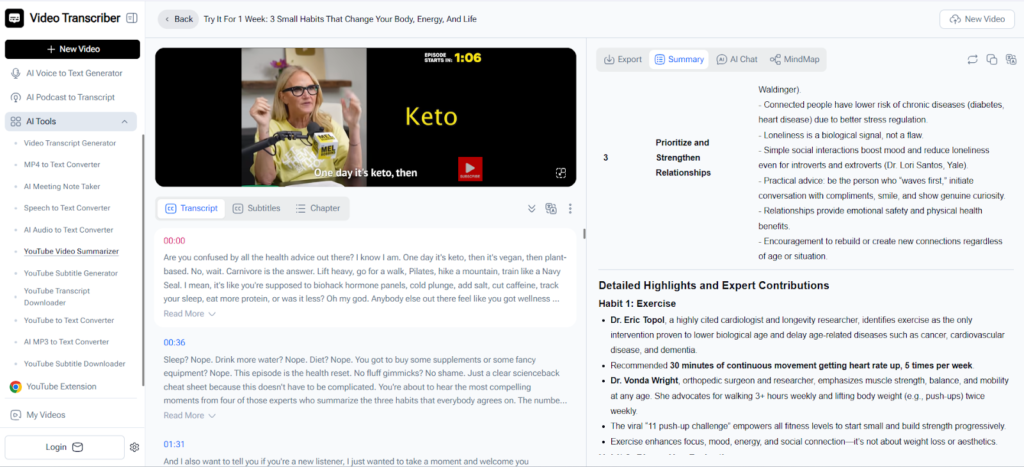
(Video Transcriber AI helps you reach a wider range of content with its YouTube Video Summarizer, which supports 100+ languages.)
A simple workflow I actually use
Step 1: Collect a few useful videos
I save three to five videos around the topic I want to cover.
Step 2: Run them through Video Transcriber AI’s YouTube Video Summarizer
I use Video Transcriber AI (https://videotranscriber.ai/) to get the key points first instead of watching everything in full.
Step 3: Pull the strongest ideas into my notes
I move useful takeaways into Notion or Google Docs and group them by angle, hook, example, or audience pain point.
Step 4: Build the script
Now I am writing from organized material, not from a pile of open tabs.
Step 5: Repurpose after publishing
If the topic performs well, I can reuse those notes for shorts, posts, captions, or follow-up content.
Why I would recommend Video Transcriber AI to other creators
What I like most about Video Transcriber AI’s YouTube Video Summarizer is that it does not try to replace the creative part of the process. It just makes the messy part more manageable.
That is why it works so well in a creator workflow. It helps me get through research faster, organize ideas more clearly, and turn reference material into something I can actually use. Instead of spending too much time digging through long videos, I can move more quickly toward scripting, filming, and publishing.
If a big part of your workflow starts with YouTube research, Video Transcriber AI is worth trying. Video Transcriber AI’s YouTube Video Summarizer takes one of the slowest parts of content creation and makes it far easier to handle. For me, that means fewer wasted tabs, clearer notes, and a much faster path from inspiration to execution.