
When people first encounter an Image to Video AI tool, the expectation is often simple: upload a photo, get a short animation. But in practice, what many users are really looking for is something more subtle—a way to turn static visuals into something that feels intentional, almost cinematic, without needing editing software or production experience. That gap between expectation and execution is exactly where tools like Image to Video AI start to feel relevant.
The difficulty has never been access to images. It has been the transition from stillness to motion. Traditional workflows require timelines, keyframes, and a sense of visual pacing. For most users, that becomes friction. What changes here is not just automation, but the removal of the need to think in technical terms.
Why Static Images Fail in Modern Content Environments
Content Requires Movement to Hold Attention
In social platforms and marketing environments, still images are increasingly treated as incomplete assets. A single photo rarely sustains attention long enough to communicate a full idea.
Editing Knowledge Becomes a Bottleneck
Most people can describe what they want a video to feel like. Few can translate that into editing software steps. This gap creates a dependency on tools that can interpret language instead of timelines.
Narrative Is Lost Without Motion
A still image captures a moment. A video suggests a sequence. Without motion, context is implied but not developed.
How The System Interprets Motion From Input
Natural Language as Control Layer
Instead of specifying technical parameters, users describe outcomes. Phrases like “slow zoom,” “dramatic lighting shift,” or “soft cinematic movement” are mapped into motion instructions.
Model Selection Influences Output Style
The platform allows users to choose between different models. In my observation, this choice subtly changes how motion behaves—some outputs feel smoother, others more stylized.
Image Structure Guides Animation
The original image still matters. Composition, depth, and subject clarity affect how believable the generated motion feels.
What The Creation Flow Actually Looks Like
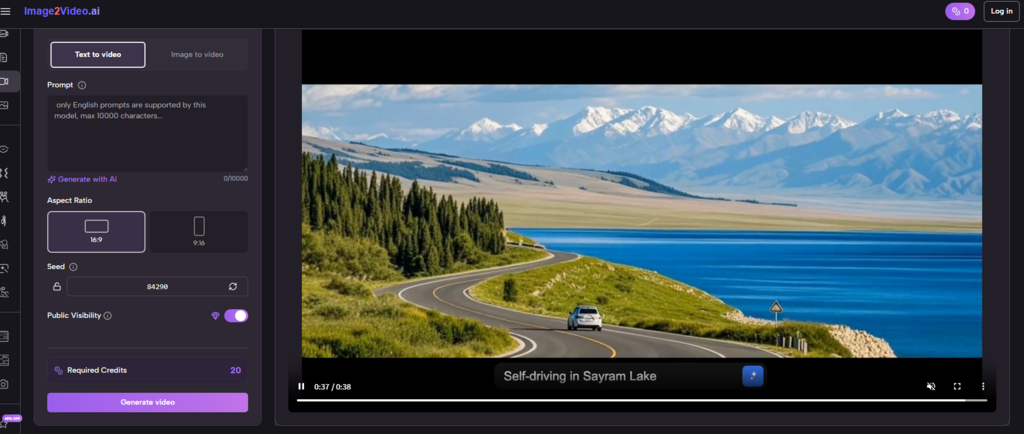
Step 1 Upload A Source Image
Users begin by uploading a JPEG or PNG file. The system relies on this image as the structural base for all animation.
Step 2 Describe Motion And Style
A text prompt is entered to define how the image should evolve. This includes movement, mood, and visual tone.
Step 3 Select Model And Generate Video
A model is chosen, and the system processes the request. From my testing, generation typically takes a few minutes.
Comparing This Workflow With Traditional Editing Approaches
| Aspect | AI-Based Video Creation | Traditional Editing |
| Skill Requirement | Low | High |
| Time To Output | Minutes | Hours |
| Motion Control | Prompt-based | Manual keyframes |
| Flexibility | Moderate | High |
| Learning Curve | Minimal | Steep |
The comparison highlights something important: this is not a replacement for professional editing, but an alternative path for a different type of user.
Where This Type Of Tool Becomes Useful
Short-Form Content Production
For creators producing frequent content, speed matters more than precision. The ability to generate motion quickly changes output volume.
Product Visualization
Turning product images into dynamic visuals adds perceived value without requiring full video shoots.
Personal Media Transformation
Old photos, portraits, or simple snapshots can be reinterpreted into moving sequences, which often feels more engaging than static albums.
What Still Feels Unresolved
Prompt Sensitivity
Results depend heavily on how the prompt is written. Small changes in wording can produce noticeably different outputs.
Consistency Across Generations
Repeated generations of the same input may not produce identical results. This variability can be useful creatively, but unpredictable in structured workflows.
Control Limitations
Compared to manual editing, precise control over timing and transitions remains limited.
How This Changes Creative Decision Making
What stands out is not just the speed, but the shift in how decisions are made. Instead of asking “how do I animate this,” users ask “what should this feel like.” That shift reduces technical barriers and increases conceptual thinking.
In that sense, the tool is less about automation and more about translation—turning intent into motion.
Where Photo-Based Video Fits Into Broader Workflows
Later in the process, many users move from basic animation into more structured outputs, such as turning a sequence of images into a cohesive video. This is where the idea of Photo to Video becomes relevant—not as a separate tool, but as an extension of the same logic.
By chaining multiple generated clips or applying consistent prompts across images, a more complete narrative can emerge.
Why This Approach Feels Different
Traditional tools ask users to adapt to software logic. This system attempts to adapt to human description. The difference may seem small, but it fundamentally changes accessibility.
From what I have observed, the real value is not in perfect realism, but in reducing the gap between idea and output.
What To Expect Going Forward
If this direction continues, we will likely see:
- Better consistency across outputs
- More precise control through language
- Integration with audio and multi-scene workflows
But even in its current state, the core idea is already clear: motion no longer requires editing knowledge. It requires articulation.
And for many users, that alone changes what feels possible.